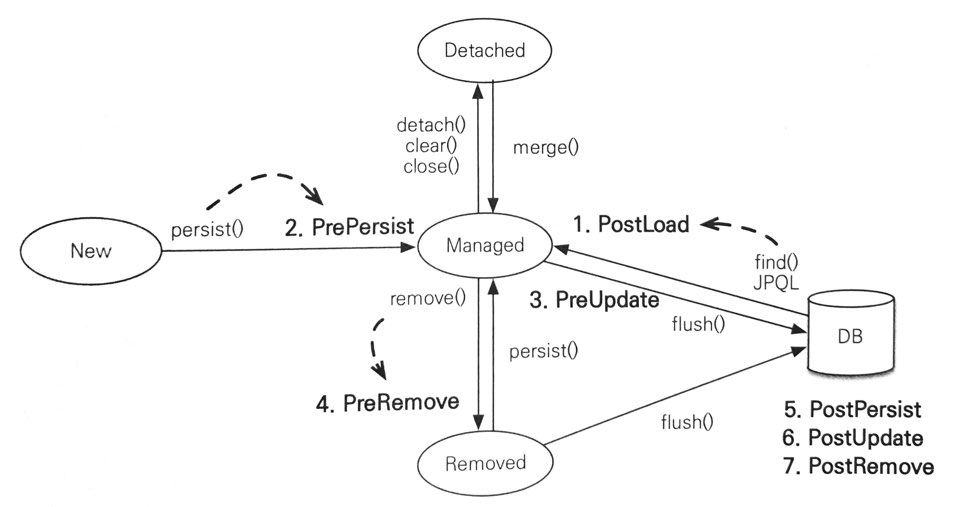
{"componentChunkName":"component---src-templates-post-jsx","path":"/[JPA]14/","result":{"data":{"site":{"siteMetadata":{"title":"SUbbb"}},"markdownRemark":{"id":"5f07d9ea-eadc-54ea-90b2-efe93297170f","excerpt":"자바 ORM 표준 JPA 프로그래밍 - 김영한을 읽고 인용하고 정리하는 POST입니다. 컬렉션: 다양한 컬렉션과 특징을 설명한다.\n컨버터: 엔티티의 데이터를 변환해서 데이터베이스에 저장한다.\n리스너: 엔티티에서 발생한 이벤트를 처리한다.\n엔티티 그래프: 엔티티를 조회할 때 연관된 엔티티들을 선택해서 함께 조회한다. 💫 컬렉션 JPA는 자바에서 기본으로 제…","html":"<p><em>[자바 ORM 표준 JPA 프로그래밍 - 김영한]을 읽고 인용하고 정리하는 POST입니다.</em></p>\n<blockquote>\n<p><strong>컬렉션</strong>: 다양한 컬렉션과 특징을 설명한다.\n<strong>컨버터</strong>: 엔티티의 데이터를 변환해서 데이터베이스에 저장한다.\n<strong>리스너</strong>: 엔티티에서 발생한 이벤트를 처리한다.\n<strong>엔티티</strong> 그래프: 엔티티를 조회할 때 연관된 엔티티들을 선택해서 함께 조회한다.</p>\n</blockquote>\n<h2>💫 컬렉션</h2>\n<p>JPA는 자바에서 기본으로 제공하는 <code class=\"language-text\">Collection</code> , <code class=\"language-text\">List</code> , <code class=\"language-text\">Set</code> , <code class=\"language-text\">Map</code> 컬렉션을 지원한다. 그리고 다음 경우에 사용할 수 있다.</p>\n<ul>\n<li><code class=\"language-text\">@OneToMany</code> , <code class=\"language-text\">@ManyToMany</code> 를 사용해서 일대다나 다대다 엔티티 관계 매핑 시</li>\n<li><code class=\"language-text\">@ElementCollection</code> 을 사용해 값 타입을 하나 이상 보관할 때</li>\n</ul>\n<p>자바 컬렉션 인터페이스의 특징</p>\n<ul>\n<li><code class=\"language-text\">Colleciton</code> : 자바가 제공하는 최상위 컬렉션, Hibernate는 중복을 허용하고 순서를 보장하지 않는다고 가정한다.</li>\n<li><code class=\"language-text\">Set</code> : 중복을 허용하지 않는 컬렉션, 순서를 보장하지 않는다.</li>\n<li><code class=\"language-text\">List</code> : 순서가 있는 컬렉션, 순서를 보장하고 중복을 허용한다.</li>\n<li><code class=\"language-text\">Map</code> : <code class=\"language-text\">Key</code> &#x26; <code class=\"language-text\">Value</code> 구조로 되어 있는 특수한 컬렉션</li>\n</ul>\n<h3>➰ JPA와 컬렉션</h3>\n<p>Hibernate는 엔티티를 영속 상태로 만들 때 컬렉션 필드를 <strong>준비한 컬렉션으로 감싸서 허용</strong>한다.</p>\n<deckgo-highlight-code language=\"java\" terminal=\"carbon\" theme=\"a11y-dark\" line-numbers=\"true\"  >\n          <code slot=\"code\">@Entity\npublic class Team {\n\n  @Id\n  private String id;\n\n  @OneToMany\n  @JoinColumn\n  private Collection&lt;Member&gt; members = new ArrayList&lt;&gt;();\n  ...\n\n}</code>\n        </deckgo-highlight-code>\n<p><code class=\"language-text\">members</code> 컬렉션을 필드로 가지고 있는 엔티티를 영속 상태로 만들어 본다 (<code class=\"language-text\">em.persist</code>). <code class=\"language-text\">persist</code> 전과 후의 클래스 정보를 출력해보면,</p>\n<ul>\n<li>\n<p>원래 <strong><code class=\"language-text\">ArrayList</code> 타입</strong>이었던 컬렉션이 Hibernate가 제공하는 <strong><code class=\"language-text\">PersistentBag</code> 타입</strong>으로 변경되는 것을 확인할 수 있다.</p>\n<ul>\n<li>이는 Hibernate가 컬렉션의 효율적인 관리를 위해 원본 컬렉션을 감싸는 내장 컬렉션(또는 Wrapper 컬렉션)을 생성해 이 내장 컬렉션을 사용하도록 참조를 변경하는 것이다.</li>\n</ul>\n</li>\n<li>이러한 특징때문에 위 예제처럼 컬렉션 사용 시에는 즉시 초기화하여 사용하는 것을 권장한다.</li>\n</ul>\n<p><strong>📌 컬렉션 인터페이스에 따른 Hibernate 내장 컬렉션과 특징</strong>\n|<strong>컬렉션 인터페이스</strong>|<strong>내장 컬렉션</strong>|<strong>중복 허용</strong>|<strong>순서 보관</strong>|\n|:---:|:---:|:---:|:---:|\n|Collection, List|PersistentBag|O|X|\n|Set|PersistentSet|X|X|\n|List + @OrderColumn|PersistentList|O|O|</p>\n<h3>➰ Collection, List</h3>\n<p>중복을 허용하므로, 객체를 추가하는 <code class=\"language-text\">add()</code> 메소드는 내부에서 어떤 비교도 하지 않고 항상 <code class=\"language-text\">true</code> 를 반환한다.</p>\n<ul>\n<li>같은 엔티티가 있는지 찾거나 삭제할 때는 <code class=\"language-text\">equals()</code> 메소드를 사용한다.</li>\n</ul>\n<blockquote>\n<p>엔티티를 추가할 때 중복된 엔티티가 있는지 비교하지 않고 단순히 저장만 수행한다. 따라서 엔티티를 추가해도 지연 로딩된 컬렉션을 초기화하지 않는다.</p>\n</blockquote>\n<h3>➰ Set</h3>\n<p><code class=\"language-text\">HashSet</code> 으로 초기화한다. 중복을 허용하지 않아 <code class=\"language-text\">add()</code> 메소드로 객체를 추가할 때마다 <code class=\"language-text\">equals()</code> 메소드로 같은 객체가 있는지 비교한다.</p>\n<ul>\n<li>같은 객체가 없으면 객체를 추가하고 <code class=\"language-text\">true</code> 를 반환하고, </li>\n<li>같은 객체가 이미 있어 추가에 실패하면 <code class=\"language-text\">false</code> 를 반환한다.</li>\n<li>참고로 <code class=\"language-text\">HashSet</code> 은 <strong>해시 알고리즘</strong>을 사용해 <code class=\"language-text\">hashcode()</code> 도 함께 사용해서 비교한다.</li>\n</ul>\n<blockquote>\n<p>엔티티를 추가할 때 중복된 엔티티에 대한 비교를 수행한다. 따라서 엔티티를 추가할 때 지연 로딩된 컬렉션을 초기화한다.</p>\n</blockquote>\n<h3>➰ List + @OrderColumn</h3>\n<p><code class=\"language-text\">List</code> 인터페이스에 <code class=\"language-text\">@OrderColumn</code> 을 추가하면 순서가 있는 특수한 컬렉션으로 인식한다.</p>\n<ul>\n<li>순서가 있다는 의미는 \"<strong>데이터베이스에 순서 값을 저장해서 조회할 때 사용한다</strong>\"는 의미이다.</li>\n<li>\n<p><code class=\"language-text\">@OrderColumn</code> 의 <code class=\"language-text\">name</code> 속성으로 <code class=\"language-text\">List</code> 의 위치 값을 보관할 컬럼을 지정할 수 있다.</p>\n<ul>\n<li>일대다 관계의 특성상 위치 값은 다쪽에 저장된다.</li>\n</ul>\n</li>\n</ul>\n<blockquote>\n<p>실무에서 사용하기에는 단점이 많다. <code class=\"language-text\">@OrderBy</code> 나 직접 위치 값 관리하는 것을 추천</p>\n</blockquote>\n<p><strong>📌 @OrderColumn의 단점</strong></p>\n<ul>\n<li>매핑하는 엔티티와 실제 저장되는 엔티티의 위치가 달라 추가적인 UPDATE SQL이 필요하다.</li>\n<li>\n<p><code class=\"language-text\">List</code> 를 변경하면 연관된 많은 위치 값을 변경해야 한다. 중간에 있는 위치 값을 삭제하면, 그 이후에 있는 모든 값들에 대한 UPDATE SQL이 실행되어야 한다.</p>\n<ul>\n<li>만약 UPDATE SQL을 수행하지 않아, 중간에 위치 값이 없으면 조회한 <code class=\"language-text\">List</code> 에는 <code class=\"language-text\">null</code> 이 보관된다. (위치 값이 삭제된 <code class=\"language-text\">List</code>)</li>\n<li>컬렉션 순회 시 <code class=\"language-text\">NullPointerException</code> 발생</li>\n</ul>\n</li>\n</ul>\n<h3>➰ @OrderBy</h3>\n<p><code class=\"language-text\">@OrderColumn</code> 이 데이터베이스에 순서용 컬럼을 매핑해 관리했다면, <code class=\"language-text\">@OrderBy</code> 는 데이터베이스의 <code class=\"language-text\">ORDER BY</code> 절을 사용해서 컬렉션을 정렬한다.</p>\n<ul>\n<li>즉, 순서용 컬럼을 매핑할 필요가 없다.</li>\n<li>모든 컬렉션에 사용할 수 있다. </li>\n<li>엔티티의 필드를 대상으로 하고, <code class=\"language-text\">@OrderBy(\"username desc, id asc\")</code> 와 같이 사용한다.</li>\n</ul>\n<hr>\n<h2>💫 @Converter</h2>\n<p>엔티티의 데이터를 변환해서 데이터베이스에 저장할 때 사용한다.</p>\n<ul>\n<li>\n<p>회원의 VIP 여부를 자바의 <code class=\"language-text\">boolean</code> 타입을 사용하고 싶다는 가정이 있다. </p>\n<ul>\n<li>JPA를 사용하면 자바의 <code class=\"language-text\">boolean</code> 타입은 방언에 따라 다르지만 데이터베이스에 저장될 때 0 또는 1인 숫자로 저장된다.</li>\n<li>그런데 데이터베이스에 이 숫자 대신 문자 Y 또는 N으로 저장하고 싶다면 컨버터를 사용한다.</li>\n</ul>\n</li>\n</ul>\n<deckgo-highlight-code language=\"java\" terminal=\"carbon\" theme=\"a11y-dark\" line-numbers=\"true\"  >\n          <code slot=\"code\">@Entity\npublic class Member {\n\n  ...\n\n  @Convert(converter = BooleanToYNConverter.class)\n  private boolean vip;\n  ..\n\n}</code>\n        </deckgo-highlight-code>\n<ul>\n<li><code class=\"language-text\">@Convert</code> 를 적용해 데이터베이스에 저장되기 직전에 <code class=\"language-text\">BooleanToYNConverter</code> 컨버터가 동작하도록 작성했다.</li>\n</ul>\n<deckgo-highlight-code language=\"java\" terminal=\"carbon\" theme=\"a11y-dark\" line-numbers=\"true\"  >\n          <code slot=\"code\">@Converter\npublic class BooleanToYNConverter implements AttributeConverter&lt;Boolean, String&gt; {\n\n  @Override\n  public String converToDatabaseColumn(Boolean attribute) {\n    return (attribute != null &amp;&amp; attribute) ? &quot;Y&quot; : &quot;N&quot;;\n  }\n\n  @Override\n  public Boolean convertToEntityAttribute(String dbData) {\n    return &quot;Y&quot;.equals(dbData);\n  }\n}</code>\n        </deckgo-highlight-code>\n<ul>\n<li>컨버터 클래스는 <code class=\"language-text\">@Converter</code> annotation을 사용하고, <code class=\"language-text\">AttributeConverter</code> 인터페이스를 구현해야 한다.</li>\n<li>또한 제네릭에 현재 타입과 변환할 타입을 지정한다.</li>\n</ul>\n<p><strong>구현해야 할 메소드</strong></p>\n<ul>\n<li><code class=\"language-text\">converToDatabaseColumn()</code> : 엔티티의 데이터를 데이터베이스 컬럼에 저장할 데이터로 변환한다. </li>\n<li><code class=\"language-text\">convertToEntityAttribute()</code> : 데이터베이스에서 조회한 컬럼 데이터를 엔티티의 데이터로 변환한다.</li>\n</ul>\n<p>또한 클래스 레벨에도 설정할 수 있다. 이때는 <code class=\"language-text\">attributeName</code> 속성으로 컨버터를 적용할 필드를 명시해야 한다.</p>\n<h3>➰ 글로벌 설정</h3>\n<p>모든 <code class=\"language-text\">Boolean</code> 타입에 컨버터를 적용하기 위해 컨버터 클래스에 <code class=\"language-text\">@Converter(autoApply = true)</code> 옵션을 적용하면 된다. 이제 <code class=\"language-text\">@Convert</code> 를 적용하지 않아도 자동으로 적용된다.</p>\n<table>\n<thead>\n<tr>\n<th align=\"center\"><strong>속성</strong></th>\n<th align=\"center\"><strong>기능</strong></th>\n<th align=\"center\"><strong>기본 값</strong></th>\n</tr>\n</thead>\n<tbody>\n<tr>\n<td align=\"center\">converter</td>\n<td align=\"center\">사용할 컨버터를 지정한다.</td>\n<td align=\"center\"></td>\n</tr>\n<tr>\n<td align=\"center\">attributeName</td>\n<td align=\"center\">컨버터를 적용할 필드를 지정한다.</td>\n<td align=\"center\"></td>\n</tr>\n<tr>\n<td align=\"center\">disableConversion</td>\n<td align=\"center\">글로벌 컨버터나 상속 받은 컨버터를 사용하지 않는다.</td>\n<td align=\"center\"><code class=\"language-text\">false</code></td>\n</tr>\n</tbody>\n</table>\n<hr>\n<h2>💫 리스너</h2>\n<p>JPA 리스너 기능을 사용해 엔티티의 생명주기에 따른 이벤트를 처리할 수 있다.</p>\n<h3>➰ 이벤트 종류</h3>\n<p>아래는 이벤트의 종류와 발생 시점이다.</p>\n<img src='https://img1.daumcdn.net/thumb/R1280x0/?scode=mtistory2&amp;fname=https%3A%2F%2Fblog.kakaocdn.net%2Fdn%2Fdn1cwM%2FbtriRZvMBaA%2FgkP85jPClmov7R6wGXmNa0%2Fimg.png' width='70%'>\n<ol>\n<li><strong>PostLoad</strong> : 엔티티가 영속성 컨텍스트에 조회된 직후 또는 <code class=\"language-text\">refresh</code> 를 호출한 후 (2차 캐시에 저장되어 있어도 호출)</li>\n<li><strong>PrePersist</strong> : <code class=\"language-text\">persist()</code> 메소드를 호출해서 엔티티를 영속성 컨텍스트에 관리하기 직전에 호출된다. 식별자 생성 전략을 사용한 경우 엔티티에 식별자는 아직 존재하기 전이다. 새로운 인스턴스를 <code class=\"language-text\">merge</code> 할 때도 수행</li>\n<li><strong>PreUpdate</strong> : <code class=\"language-text\">flush</code> 나 <code class=\"language-text\">commit</code> 을 호출해서 엔티티를 데이터베이스에 수정하기 직전에 호출</li>\n<li><strong>PreRemove</strong> : <code class=\"language-text\">remove()</code> 메소드를 호출해서 엔티티를 영속성 컨텍스트에서 삭제하기 직전에 호출된다. 또한 삭제 명령어로 영속성 전이가 일어날 때도 호출 (<code class=\"language-text\">orphanRemoval</code> 에 대해서는 <code class=\"language-text\">flush</code> 나 <code class=\"language-text\">commit</code> 시 호출)</li>\n<li><strong>PostPersist</strong> : <code class=\"language-text\">flush</code> 나 <code class=\"language-text\">commit</code> 을 호출해서 엔티티를 데이터베이스에 저장한 직후 호출된다. (식별자가 항상 존재) </li>\n<li><strong>PostUpdate</strong> : <code class=\"language-text\">flush</code> 나 <code class=\"language-text\">commit</code> 을 호출해서 엔티티를 수정한 직후 호출</li>\n<li><strong>PostRemove</strong> : <code class=\"language-text\">flush</code> 나 <code class=\"language-text\">commit</code> 을 호출해서 엔티티를 삭제한 직후 호출</li>\n</ol>\n<h3>➰ 이벤트 적용 위치</h3>\n<p>이벤트는 엔티티에서 직접 받거나 별도의 리스너를 등록해서 받을 수 있다.</p>\n<p><strong>📌 엔티티에 직접 적용</strong><br/>\n엔티티에 이벤트가 발생할 때마다 annotation으로 지정한 메소드가 실행되도록 한다. </p>\n<ul>\n<li>엔티티 클래스에 이벤트들에 대한 메소드를 구현하는 형태다.</li>\n</ul>\n<p><strong>📌 별도의 리스너 등록</strong><br/>\n리스너는 대상 엔티티를 파라미터로 받을 수 있다. 반환 타입은 <code class=\"language-text\">void</code> 로 설정해야 한다.</p>\n<ul>\n<li>엔티티 클래스에 <code class=\"language-text\">@EntityListeners(별도의 리스너.class)</code></li>\n</ul>\n<p><strong>📌 기본 리스너 사용</strong><br/>\n모든 엔티티의 이벤트를 처리하려면 <code class=\"language-text\">META-INF/orm.xml</code> 에 기본 리스너로 등록하면 된다.</p>\n<p>여러 리스너를 등록했을 때 이벤트 호출 순서는 다음과 같다.</p>\n<ol>\n<li>기본 리스너</li>\n<li>부모 클래스 리스너</li>\n<li>리스너</li>\n<li>엔티티</li>\n</ol>\n<p><strong>📌 더 세밀한 설정</strong><br/>\n더 세밀한 설정을 위해서는 아래 annotation을 사용할 수 있다.</p>\n<ul>\n<li><code class=\"language-text\">javax.persistence.ExcludeDefaultListeners</code> : 기본 리스너 무시</li>\n<li><code class=\"language-text\">javax.persistence.ExcludeSuperclassListeners</code> 상위 클래스 이벤트 리스너 무시</li>\n</ul>\n<hr>\n<h2>💫 엔티티 그래프</h2>\n<p>글로벌 <code class=\"language-text\">fetch</code> 옵션은 애플리케이션 전체에 영향을 주고, 변경할 수 없다는 단점이 있다. 그래서 일반적으로 <strong>글로벌 <code class=\"language-text\">fetch</code> 옵션은 <code class=\"language-text\">FetchType.LAZY</code></strong> 를 사용하고, 엔티티 조회 시 연관된 엔티티를 함께 조회해야 한다면 <strong>JPQL 페치 조인을 사용</strong>한다.</p>\n<ul>\n<li>그런데 페치 조인을 사용하면, 같은 JPQL을 중복해서 작성하는 경우가 많다.</li>\n<li>이는 JPQL이 데이터를 조회하는 기능뿐 아니라 연관된 엔티티를 함께 조회하는 기능도 제공하기 때문에 발생하는 문제이다.</li>\n</ul>\n<p>JPA 2.1에 추가된 <strong>엔티티 그래프 기능</strong>을 사용해 엔티티를 조회하는 시점에 <strong>함께 조회할 연관된 엔티티를 선택</strong>할 수 있다.</p>\n<ul>\n<li>따라서 JPQL은 데이터를 조회하는 기능만을 수행하여 위 문제는 발생하지 않는다.</li>\n<li>엔티티 그래프는 정적으로 정의하는 Named 엔티티 그래프와 동적으로 정의하는 엔티티 그래프가 있다.</li>\n</ul>\n<h3>➰ Named 엔티티 그래프</h3>\n<p><code class=\"language-text\">@NamedEntityGraph</code> 로 정의한다. </p>\n<ul>\n<li><code class=\"language-text\">name</code> : 엔티티 그래프의 이름을 정의</li>\n<li><code class=\"language-text\">attributeNodes</code> : 함께 조회할 속성을 선택</li>\n</ul>\n<h3>➰ em.find()에서 엔티티 그래프 사용</h3>\n<p>Named 엔티티 그래프를 사용하려면 정의한 엔티티 그래프를 <code class=\"language-text\">em.getEntityGraph(\"정의한 엔티티 그래프 이름\")</code> 을 통해서 찾아오면 된다.</p>\n<h3>➰ subgraph</h3>\n<p><code class=\"language-text\">subgraph</code> 를 사용해 관리하지 않는 연관된 엔티티의 필드까지 조회할 수 있다.</p>\n<ul>\n<li>관리할 수 있는 객체 그래프가 아니더라도 <code class=\"language-text\">subgraphs</code> 속성을 정의하여 <code class=\"language-text\">@NamedSubgraph</code> 를 사용해 서브 그래프를 정의할 수 있다.</li>\n</ul>\n<h3>➰ JPQL에서 엔티티 그래프 사용</h3>\n<p><code class=\"language-text\">em.find()</code> 와 동일하게 힌트만 추가하여 사용할 수 있다.</p>\n<blockquote>\n<p><code class=\"language-text\">em.find()</code> 에서 엔티티 그래프를 사용하면 Hibernate는 필수 관계를 고려해 SQL 내부 조인을 사용하지만, JPQL에서 엔티티 그래프를 사용할 때는 항상 SQL 외부 조인을 사용한다.</p>\n<ul>\n<li>내부 조인을 사용하려면 이를 명시해야 한다.</li>\n</ul>\n</blockquote>\n<h3>➰ 동적 엔티티 그래프</h3>\n<p><code class=\"language-text\">em.createEntityGraph()</code> 메소드를 사용해 동적으로 엔티티 그래프를 생성할 수 있다.</p>\n<deckgo-highlight-code language=\"java\" terminal=\"carbon\" theme=\"a11y-dark\" line-numbers=\"true\"  >\n          <code slot=\"code\">public &lt;T&gt; EntityGraph&lt;T&gt; createEntityGraph(Class&lt;T&gt; rootType);</code>\n        </deckgo-highlight-code>\n<ul>\n<li><code class=\"language-text\">addAttributeNodes(\"필드\")</code> 를 사용해 엔티티의 필드 속성을 엔티티 그래프에 포함할 수 있다.</li>\n<li>또한 <code class=\"language-text\">addSubgraph()</code> 메소드로 서브 그래프를 추가할 수 있다.</li>\n</ul>\n<h2>📕 출처</h2>\n<ul>\n<li><strong>자바 ORM 표준 JPA 프로그래밍</strong> - 김영한</li>\n<li><a href=\"https://milenote.tistory.com/150\">[자바 ORM 표준 JPA 프로그래밍] 14.3 리스너</a></li>\n</ul>","frontmatter":{"title":"📚 14. 컬렉션과 부가 기능","date":"April 05, 2022","update":"April 05, 2022","tags":["Java","JPA","SpringBoot"],"series":"📚 ORM 표준 JPA"},"fields":{"slug":"/[JPA]14/","readingTime":{"minutes":15.88}}},"seriesList":{"edges":[{"node":{"id":"66d0397b-0a88-53f8-9e40-01878853acdd","fields":{"slug":"/[JPA]1/"},"frontmatter":{"title":"📚 1. JPA 소개"}}},{"node":{"id":"f86fa867-f096-52ce-854a-ef00e49ebcdb","fields":{"slug":"/[JPA]2/"},"frontmatter":{"title":"📚 2. JPA 시작"}}},{"node":{"id":"ffb8392d-d300-51c1-8e71-a8943ef4b58d","fields":{"slug":"/[JPA]3/"},"frontmatter":{"title":"📚 3. 영속성 관리"}}},{"node":{"id":"f45d0c27-c0da-5191-8c86-2aef34b75f27","fields":{"slug":"/[JPA]4/"},"frontmatter":{"title":"📚 4. 엔티티 매핑"}}},{"node":{"id":"c710307c-927c-5c1b-80fb-c45a4ff20616","fields":{"slug":"/[JPA]5/"},"frontmatter":{"title":"📚 5. 연관관계 매핑 기초"}}},{"node":{"id":"24c890e9-eebe-56bf-9db2-8660dcb3b783","fields":{"slug":"/[JPA]6/"},"frontmatter":{"title":"📚 6. 다양한 연관관계 매핑"}}},{"node":{"id":"26e75089-52ac-5b50-98c9-c2806068b034","fields":{"slug":"/[JPA]7/"},"frontmatter":{"title":"📚 7. 고급 매핑"}}},{"node":{"id":"ac8c493e-a661-53a5-989d-b84fcb728ed1","fields":{"slug":"/[JPA]8/"},"frontmatter":{"title":"📚 8. 프록시와 연관관계 관리"}}},{"node":{"id":"5003d7a8-381f-550d-aecd-28caba14aba9","fields":{"slug":"/[JPA]9/"},"frontmatter":{"title":"📚 9. 값 타입"}}},{"node":{"id":"a41dc548-d976-533a-a680-96e86a627d35","fields":{"slug":"/[JPA]10/"},"frontmatter":{"title":"📚 10. 객체지향 쿼리 언어"}}},{"node":{"id":"4ef1a134-ac1d-5e69-9f85-7c1b5d7a8244","fields":{"slug":"/[JPA]11/"},"frontmatter":{"title":"📚 11. 웹 애플리케이션 제작"}}},{"node":{"id":"1a74ae89-3758-5cb9-938c-b8238d176c8c","fields":{"slug":"/[JPA]12/"},"frontmatter":{"title":"📚 12. 스프링 데이터 JPA"}}},{"node":{"id":"5900f638-1417-5a4a-a147-a228540a920b","fields":{"slug":"/[JPA]13/"},"frontmatter":{"title":"📚 13. 웹 애플리케이션과 영속성 관리"}}},{"node":{"id":"5f07d9ea-eadc-54ea-90b2-efe93297170f","fields":{"slug":"/[JPA]14/"},"frontmatter":{"title":"📚 14. 컬렉션과 부가 기능"}}},{"node":{"id":"838bd515-9bd3-5d4b-8f49-723d3f55688c","fields":{"slug":"/[JPA]15/"},"frontmatter":{"title":"📚 15. 고급 주제와 성능 최적화"}}},{"node":{"id":"1f449b33-36ba-58f9-915f-be058ee6ba3e","fields":{"slug":"/[JPA]16/"},"frontmatter":{"title":"📚 16. 트랜잭션과 락, 2차 캐시"}}}]},"previous":{"fields":{"slug":"/[JPA]13/"},"frontmatter":{"title":"📚 13. 웹 애플리케이션과 영속성 관리"}},"next":{"fields":{"slug":"/[JPA]15/"},"frontmatter":{"title":"📚 15. 고급 주제와 성능 최적화"}}},"pageContext":{"id":"5f07d9ea-eadc-54ea-90b2-efe93297170f","series":"📚 ORM 표준 JPA","previousPostId":"5900f638-1417-5a4a-a147-a228540a920b","nextPostId":"838bd515-9bd3-5d4b-8f49-723d3f55688c"}},"staticQueryHashes":[]}